

A mount that fits your TV can still miss the mark if it cannot reach around a corner, clear glare, or suit your wall. This Best TV Wall Mount guide compares models by TV size, VESA pattern, supported wall type, weight limit, and range of movement, so you can narrow the options to your room and installation needs.
Check your TV’s mounting-hole pattern and weight, then identify the wall structure before choosing. Those details matter more than screen size alone. For broader display shopping, see our guides to the best 55-inch TVs and TVs under $300.
Pros
- Low-profile 1.1-inch design
- Supports up to 132 lb
- Fits several stud spacings
- UL Listed
Cons
- Fixed design does not tilt
- Not for drywall-only installation
- Skip it if you need adjustable tilt

Pros
- Long extension suits corner installations
- Wide supported VESA range
- Tool-free tilt adjustment
- Post-install leveling adjustment
Cons
- Not suitable for drywall-only installation
- Who should skip it: anyone needing drywall-only mounting
Pros
- Supports TVs up to 120 inches
- Wide extension and swivel range
- Includes drilling template and bubble level
Cons
- Skip if TV exceeds size, weight, or VESA limits
Pros
- Studless drywall mounting
- Supports up to 99 lb
- Includes bubble level and mounting hardware
Cons
- Uses 25 nails, so installation punctures drywall
- Skip it if you need a stud-mounted bracket

Pros
- Fits TVs from 42 to 90 inches
- Supports up to 132 lb
- Includes mounting hardware and cable ties
Cons
- Concrete anchors are not included
- Skip it if your installation requires included concrete anchors
Pros
- Broad 42- to 90-inch TV size range
- 22-inch extension and 130-degree swivel
- Tool-free tilt adjustment
- UL listed
Cons
- Requires drilling into a wall

Pros
- Supports TVs up to 132 lb
- Low 1.1-inch retracted profile
- Post-install leveling adjustment of ±3°
Cons
- Skip it if mounting to drywall alone
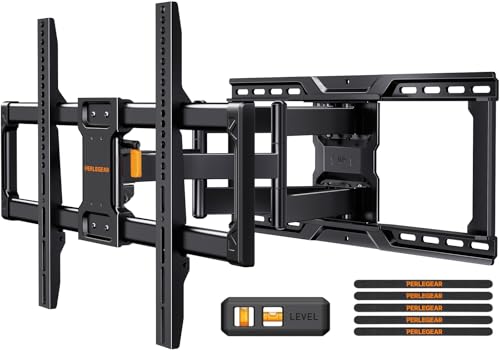
Pros
- Broad TV size and VESA compatibility
- Swivel, tilt, and extension adjustment
- Pre-assembled design
Cons
- Cannot be installed on drywall alone
- Who should skip it: anyone needing drywall-only installation

Pros
- Tilt and swivel adjustment
- Extends and retracts
- Supports up to 110 lb
- Post-installation leveling adjustment
Cons
- Not for drywall-only installation
- Designed for standard 16-inch studs
- Skip it if your setup needs a different stud spacing

Pros
- Supports TVs up to 115 lb
- Low-profile 1.2-inch design
- Downward tilt and pull-cord release
Cons
- Not suitable for drywall-only installation
- Who should skip it: buyers needing a mount for unsupported VESA patterns
The Best TV Wall Mount by Use Case
Best for Corner Placement: Perlegear Corner TV Wall Mount Long Arm TV Mount
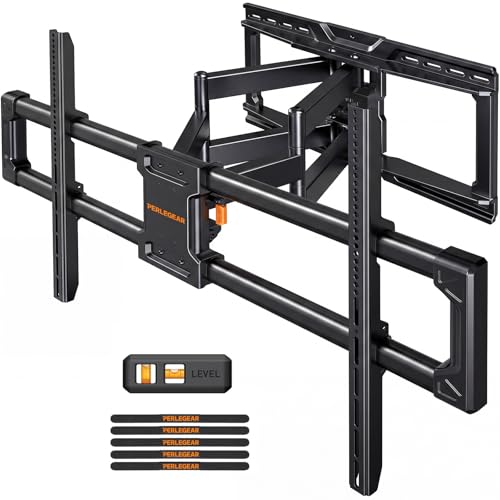
The Perlegear Corner TV Wall Mount Long Arm TV Mount is designed for 37- to 75-inch TVs and reaches 32.37 inches from the wall. That extra reach can help position a screen near a corner or turn it toward different seating areas. Its listed movement includes up to 90 degrees of swivel in either direction and tilt from -15 to +5 degrees.
Reasons to buy:
- Long 32.37-inch extension suits corner layouts and distant seating.
- Supports TVs up to 100 lb and VESA patterns up to 600 x 400 mm.
- Post-install leveling and tool-free tilt help refine screen position.
Reasons to avoid:
- Its listed TV size limit is 75 inches, so larger screens need another mount.
- Install on wood studs, concrete, or brick, not drywall alone.
Skip it if your TV exceeds its size or weight limits, or you want a fixed, close-to-wall installation.
Best for Extra-Large TVs: Perlegear Large Full Motion TV Wall Mount
The Perlegear Large Full Motion TV Wall Mount accommodates listed screen sizes from 55 to 120 inches and weights up to 220 lb. Its VESA range reaches 900 x 600 mm, broader than the other mounts in this selection. It extends 22 inches and swivels up to 65 degrees, making it a candidate for large screens that need some repositioning.
Reasons to buy:
- Supports a listed maximum of 120 inches and 220 lb.
- Fits 16- or 24-inch wood studs, solid concrete, or brick.
- Pre-assembled design, drilling template, and included bubble level are listed for installation.
Reasons to avoid:
- Its listed swivel range is 65 degrees, less than some smaller-TV mounts.
- Confirm the TV’s VESA pattern and actual weight before installation.
Skip it if you have a smaller TV or do not need a mount built around an extra-large screen’s weight and VESA range.
Best Fixed Option: Mounting Dream TV Mount Fixed for Most 42-84 Inch
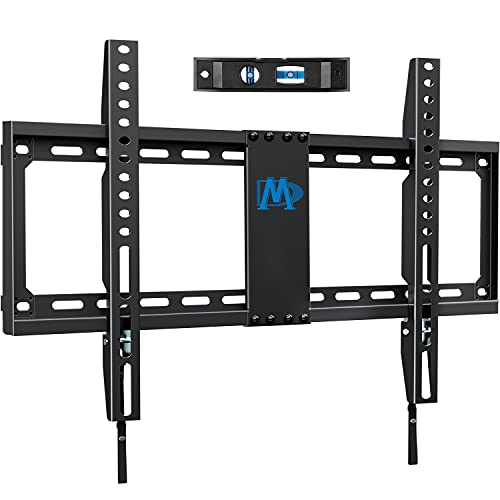
The Mounting Dream TV Mount Fixed for Most 42-84 Inch suits a setup where the screen can stay in one viewing position. Its fixed design holds the TV 1.1 inches from the wall and supports listed screens from 42 to 84 inches, up to 132 lb. This low-profile style avoids an articulating arm, but it cannot swivel or tilt to adjust the viewing angle.
Reasons to buy:
- Low 1.1-inch profile keeps the screen close to the wall.
- Supports VESA patterns up to 600 x 400 mm and listed TV weights up to 132 lb.
- Fits 16-, 18-, and 24-inch wood studs, as well as brick or concrete walls.
Reasons to avoid:
- Fixed position offers no tilt or swivel adjustment.
- Drywall alone is not a supported installation surface.
Skip it if your seats are off to one side, or you need to angle the screen to reduce glare.
Best for Drywall Without Stud Access: Auoace No Stud TV Wall Mount
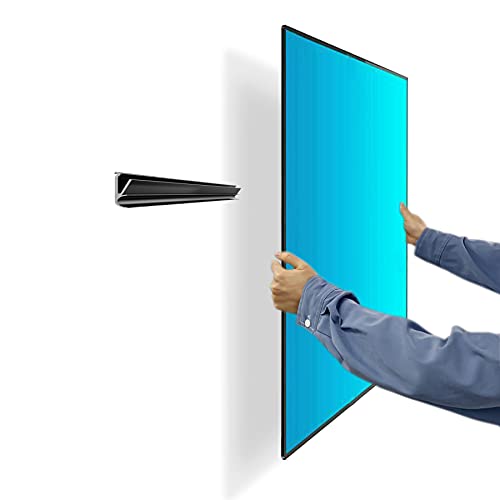
The Auoace No Stud TV Wall Mount is the list’s studless option for drywall, with listed compatibility for 13- to 55-inch TVs up to 99 lb. It supports VESA patterns from 100 x 100 mm to 400 x 400 mm and holds the TV about 1.1 inches from the wall. Its installation approach differs from mounts designed to attach to studs, so follow the supplied instructions and verify the wall and TV requirements closely.
Reasons to buy:
- Designed for drywall installation without locating a stud.
- Also listed for monitors with compatible VESA patterns.
- Package details list mounting hardware, a bubble level, and a security cable.
Reasons to avoid:
- Its screen-size range tops out at 55 inches, with a 99 lb weight limit.
- VESA compatibility and installation surface still need to match the TV and wall.
Skip it if your TV is larger than 55 inches or exceeds its listed weight or VESA limits.
Best Low-Profile Full-Motion Option: Perlegear Ultra Slim TV Wall Mount for 42-90 inch
The Perlegear Ultra Slim TV Wall Mount for 42-90 inch combines a 1.1-inch wall profile with tilt, swivel, and extension. It is listed for 42- to 90-inch TVs up to 132 lb, and extends up to 15 inches from the wall. That is less reach than long-arm options, but the compact retracted profile may suit a room where the screen usually stays near the wall.
Reasons to buy:
- Retracts to a listed 1.1-inch profile while retaining movement.
- Offers up to 45 degrees of swivel in either direction and tilt from -15 to +5 degrees.
- Designed for 16- to 24-inch studs, concrete, or brick.
Reasons to avoid:
- Its 15-inch extension is shorter than several full-motion alternatives.
- It is not intended for drywall alone.
Skip it if you need a long reach to turn a TV around a corner or across a large room.
Best for a Wide TV Size Range: Perlegear Full Motion TV Wall Mount for 45-95 inch
The Perlegear Full Motion TV Wall Mount for 45-95 inch supports listed TVs from 45 to 95 inches and up to 150 lb. It extends 22 inches, swivels up to 65 degrees in either direction, and tilts from -15 to +5 degrees. The listed fit across 8-, 12-, 16-, and 24-inch wood studs gives it more stud-spacing flexibility than mounts limited to one or two spacing options.
Reasons to buy:
- Wide listed screen range reaches 95 inches, with a 150 lb limit.
- Fits several stated wood-stud spacings, plus concrete and brick.
- Pre-assembled design and paper drilling template are listed to simplify setup.
Reasons to avoid:
- Its VESA range tops out at 600 x 400 mm, so larger patterns will not fit.
- Do not install it on drywall alone.
Skip it if your TV has a VESA pattern outside its range or weighs more than 150 lb.
Also Considered
USX Mount Full Motion TV Wall Mount for 42-90 inch could suit a large TV needing tilt and swivel, but its listed maximum stud spacing is 16 inches and its extension is 16.49 inches.
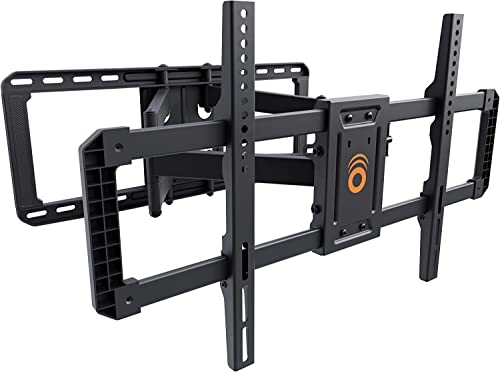
ECHOGEAR MaxMotion TV Wall Mount for 42-90” TVs may fit a room that needs up to 22 inches of reach and 130-degree swivel, though its listed weight limit is 125 lb.
Mounting Dream Full Motion TV Wall Mount for 32-70 is an option for compatible TVs up to 70 inches and 110 lb, but it is designed for standard 16-inch studs.
PERLESMITH Tilting TV Wall Mount for 23-60 inch suits a smaller screen that needs downward tilt and a 1.2-inch profile, but it does not offer swivel or extension.
How to Choose the Best TV Wall Mount
Match VESA pattern, weight, and screen size
Screen size is only one part of compatibility. Find the TV’s VESA pattern, the distance between its mounting holes in millimeters, and its weight without the stand. Compare both against the mount’s stated ranges and limits. For example, the large-screen Perlegear supports VESA up to 900 x 600 mm, while the listed range for the Perlegear 45-95-inch model stops at 600 x 400 mm. A TV within the size range can still be incompatible if its VESA pattern or weight falls outside the mount’s limits.
Check wall type and stud spacing
Most mounts in this guide are intended for wood studs, concrete, or brick, and their product information says not to install them on drywall alone. Stud spacing varies: some models list 16-inch studs only, while others accommodate 16- and 24-inch spacing or additional intervals. The Auoace model is specifically described as a studless drywall hanger, but that does not make it interchangeable with stud-mounted brackets. Confirm the wall construction and follow the instructions for the exact model you choose. For televisions that will serve as a main room display, our Roku TV buying guide can help with the screen decision too.
Choose fixed, tilting, or full motion
A fixed bracket keeps the screen in one position and can sit close to the wall, as with the Mounting Dream fixed model. A tilting mount angles the screen vertically, which can help when the TV sits above eye level or catches glare. Full-motion arms add horizontal swivel and extension, useful when seating is spread across a room or the screen needs to face a nearby space. More movement often means a longer arm and a greater distance from the wall, so compare the mount’s retracted depth and extension as well as its swivel range.
Measure the room and the TV’s connection area
Before buying, measure the space where the TV will sit and the path its arm needs to travel. A long extension can help with a corner, but it also needs room to swing without hitting a cabinet, doorway, or adjacent wall. Check whether the TV’s cable connections will remain reachable when mounted. Product listings may mention leveling or included installation guides, but they do not establish that every TV’s ports will remain accessible in every layout.
Review installation details and included parts
Compare the installation instructions, hardware list, drilling template, and any stated leveling adjustment. Some listings identify included bubble levels or labeled hardware, while concrete anchors are not included with every model. Do not assume one mount’s accessories come with another. If you are installing into masonry, verify the correct anchors and installation method for that specific bracket before starting.
How We Compared
We compared the listing information, including TV size and weight limits, VESA ranges, supported wall types and stud spacing, adjustment range, wall clearance, and listed installation details. The recommendations reflect how those specifications map to common room layouts and screen needs. Product descriptions provide manufacturer-stated features; they do not establish performance beyond those claims. Customer feedback was not supplied for this comparison, so no review consensus is inferred.
Frequently Asked Questions
How do I know whether a TV wall mount fits my television?
Check the TV’s screen size, weight, and VESA mounting-hole pattern, then compare each with the mount’s specifications. All three need to fit; a compatible screen size alone is not enough. Also check whether the bracket will block cables or connections on the back of the TV.
Can I attach a TV wall mount directly to drywall?
Most mounts in this guide say not to install them on drywall alone and instead list wood studs, concrete, or brick. The Auoace model is specifically described as a studless drywall mount, with its own TV size, weight, and VESA limits. Follow the instructions for the exact model and wall type rather than applying one mount’s installation method to another.
Is a full-motion mount better than a fixed mount?
It depends on where you sit and whether you need to move the screen. Full-motion arms can swivel and extend, which helps when viewing from different positions. A fixed bracket keeps the TV in one position and can sit close to the wall, but it cannot correct a viewing angle after installation.
What is the benefit of a tilting TV mount?
A tilting mount lets you angle the screen vertically. That can be useful when a TV sits higher than your usual viewing position or when you want to adjust its angle to address glare. Check the model’s stated tilt range, because adjustment differs between mounts.
What should I check before mounting a TV in a corner?
Measure the distance from the mounting point to the desired viewing position, and check how far the arm extends and swivels. Make sure the TV can turn without hitting the adjoining wall or furniture. Confirm that the wall structure and mounting location meet the bracket’s installation requirements.


Write Your Review
No reviews yet. Be the first to share your experience!