

Choosing a smart home hub for Home Assistant can be confusing: products may support Matter, Zigbee, or Thread, yet still depend on their own apps and ecosystems. This guide compares protocol support, local automation claims, voice assistant integration, and display features so you can narrow choices to match your devices and setup.
Home Assistant compatibility does not mean every feature works the same way across hubs. Check the integration method and supported devices before buying, especially if you want Home Assistant to manage automations rather than use a hub as a separate controller.

Pros
- Hands-free control with built-in Google Assistant
- Compact footprint fits easily on counters and nightstands
- Integrates with over 200 smart home devices
- Voice Match delivers personalized user routines
Cons
- Modest 1024x600 display resolution limits fine visual detail
- Users wanting high-definition video displays should skip it
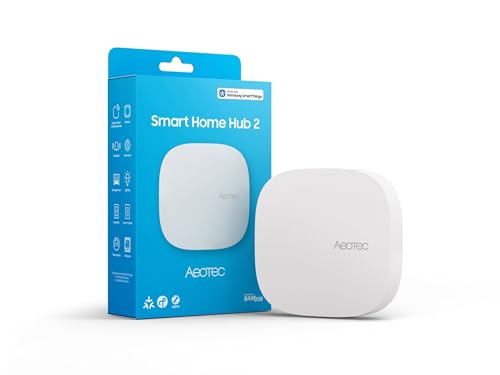
Pros
- Supports modern Matter and Zigbee device protocols
- Local automation execution works during internet outages
- Flexible setup via Wi-Fi or wired Ethernet
Cons
- Lacks Z-Wave support for legacy smart devices
- Users with existing Z-Wave setups should skip it

Pros
- Compact footprint fits easily on crowded nightstands or desks
- Voice and touchscreen controls for compatible smart devices
- Built-in Google Assistant handles reminders, timers, and streaming
Cons
- Ships in bulk packaging rather than retail box
- Korean spec model requires language reconfiguration during setup
- Skip if you need an out-of-the-box English configuration

Pros
- Supports Power over Ethernet and dual-band Wi-Fi
- Functions as both Matter controller and Thread router
- Local automation runs without active internet connection
- Integrated 360-degree infrared blaster controls legacy air conditioners
Cons
- Incompatible with third-party Zigbee accessories
- Does not include required two-amp USB power adapter
- Infrared Matter exposure limited to one air conditioner

Pros
- Power over Ethernet and dual-band Wi-Fi connectivity
- Matter controller and Thread border router capabilities
- Local automation processing reduces cloud reliance
- Encrypted storage with no microphones or cameras
Cons
- Does not support third-party Zigbee devices
- Required 2A power adapter is not included
- Exposes only one air conditioner through Matter

Pros
- Runs automations locally without cloud internet reliance
- Supports Matter, Zigbee 3.0, and Z-Wave 800
- No recurring subscription fees for core platform features
- Dedicated external antennas improve wireless mesh coverage
Cons
- Complex Rule Machine tools require a learning curve
- Casual users seeking basic plug-and-play setups should skip it

Pros
- Large 10-inch display for easy viewing
- Built-in Google Assistant for voice control
- Sub-one-pound build simplifies placement
Cons
- Four-inch depth requires substantial counter clearance
- Not ideal for tight spaces
The Best Smart Home Hubs by Use Case
Best for Home Assistant and Aqara Devices: Aqara Smart Home Hub M3 for Advanced Automation
The Aqara Smart Home Hub M3 for Advanced Automation stands out if your setup centers on Aqara devices and you want a listed route to Home Assistant through Matter bridging. Aqara specifies Zigbee and Thread support, local automation, PoE, and a 360-degree IR blaster. Its Matter bridge exposes Aqara scenes and signals to compatible ecosystems, but it is not described as a general-purpose bridge for third-party Zigbee devices.
For a growing Aqara installation, the listing specifies support for up to 127 Aqara Zigbee devices and 127 Thread devices, with repeaters needed for Thread devices. It also describes encrypted local storage for device lists, settings, and automation data. Verify that your specific Home Assistant integration supports the features you plan to use.
Reasons to buy:
- Matter bridge can expose Aqara scenes and signals to Home Assistant.
- Supports Aqara Zigbee and Thread devices, plus IR control for compatible appliances.
- PoE and local automation offer wired installation and local control options.
Reasons to avoid:
- Third-party Zigbee devices are not supported as part of the Aqara Zigbee network.
- Some cloud notifications still need an internet connection, and the USB power adapter is not included.
Skip it if you need one hub to directly coordinate a wide mix of non-Aqara Zigbee devices.
Best for Aqara Features at Entry Level: Aqara Smart Hub M200, Matter Controller
The Aqara Smart Hub M200, Matter Controller is a fit for buyers who want Aqara Zigbee, Thread, and Matter features alongside an IR blaster, without the M3’s larger listed device limits. The listing says it supports up to 40 Aqara Zigbee devices and 40 Thread devices. It also names Home Assistant among compatible ecosystems through its Matter bridging features.
This model includes Wi-Fi and PoE connectivity, plus local execution for Zigbee and Matter automations. That may suit a small Aqara-focused setup where basic routines should continue during an internet outage. Confirm what the relevant Matter integration exposes, since functionality can vary by app and some cloud functions still rely on internet access.
Reasons to buy:
- Combines Matter controller, Thread border router, and Matter bridge roles.
- IR control can connect compatible air conditioners to Matter, with stated limitations.
- PoE, dual-band Wi-Fi, and local automation provide installation and control choices.
Reasons to avoid:
- Third-party Zigbee device support is not specified; the listing explicitly excludes third-party Zigbee devices for its alarm features.
- A 2A USB power adapter is not included, and only one AC device can be exposed to Matter according to the listing.
Skip it if your main goal is directly pairing many non-Aqara Zigbee devices.
Best for Mixed Protocols and Local Rules: Hubitat Elevation C-8 Pro Smart Home Hub
The Hubitat Elevation C-8 Pro Smart Home Hub suits people who want a dedicated automation hub with Zigbee, Z-Wave, Matter, and Bluetooth support. The listing describes local automation processing and a rule engine for multi-condition routines. It also claims compatibility with more than 1,000 devices across more than 100 brands, but your exact devices and Home Assistant integration still need checking.
Unlike display-based assistants, Hubitat is built around device control and automation rather than video or voice interaction. Its two dedicated external antennas, one for Z-Wave and one for Zigbee, may be useful when placing a hub in a larger or device-dense home, although listed range does not guarantee coverage in every building.
Reasons to buy:
- Includes Z-Wave, Zigbee, Matter, and Bluetooth support in one hub.
- Local processing can keep supported automations running without internet access.
- Rule Machine supports routines with multiple conditions; no subscription is listed as required.
Reasons to avoid:
- The product listing does not explain the exact steps or feature limits for linking it with Home Assistant.
- Its automation tools may be more involved than a simple voice assistant or smart display setup.
Skip it if you want a touchscreen hub for video, recipes, and voice-led everyday help.
Best for SmartThings with Zigbee and Matter: Aeotec Smart Home Hub2 – V4
The Aeotec Smart Home Hub2 – V4 is designed around Samsung’s SmartThings app and supports Zigbee and Matter. It can suit households that already use SmartThings or want a hub for compatible lights, sensors, plugs, switches, and thermostats. The listing also describes local execution for many automations, which can help supported routines continue during temporary internet outages.
Home Assistant is not named in the supplied compatibility details, so do not assume direct integration from the Matter or Zigbee labels alone. Most importantly, this version does not support Z-Wave. If your current sensors or switches use Z-Wave, choose another hub or verify a separate compatible controller before buying.
Reasons to buy:
- Supports Matter and Zigbee devices through SmartThings.
- Offers Wi-Fi or Ethernet setup options.
- Many local automations may continue during temporary internet outages.
Reasons to avoid:
- Z-Wave is not supported.
- Home Assistant compatibility is not specified in the published product details.
Skip it if you need confirmed Home Assistant integration or Z-Wave support from this hub.
Best for a Google Assistant Display: Google Nest Hub (1st Gen)
The Google Nest Hub (1st Gen) is a 7-inch touchscreen display with Google Assistant, voice control, and smart home controls for compatible devices. It is better suited to users who want to see timers, weather, calendar information, photos, and video while controlling devices through Google’s ecosystem. The listing states compatibility with more than 200 devices from over 50 brands.
This is a display and voice assistant, not a listed Zigbee, Z-Wave, or Thread controller. The published details do not confirm Home Assistant integration, so treat it as a Google Assistant device unless you verify a supported connection for your planned setup. A 1024 by 600 screen is useful for glanceable information, but it does not replace a dedicated automation hub for protocol-specific pairing.
Reasons to buy:
- 7-inch touchscreen supports visual information and touch control.
- Google Assistant supports hands-free requests and compatible smart home controls.
- Supports listed entertainment services, including YouTube and Spotify.
Reasons to avoid:
- Home Assistant compatibility and dedicated smart home radio protocols are not specified.
- Its display and voice features may not suit buyers seeking a hub focused on local automation.
Skip it if you need a dedicated Zigbee, Z-Wave, or Thread hub for Home Assistant.
Also Considered
The Google-focused smart home hub guide may help if your devices already use Google’s ecosystem. The no-subscription hub guide covers another useful buying priority.
The hub versus bridge comparison explains why protocol support and device bridging are not interchangeable. For network basics, see smart home hub versus Wi-Fi guidance.
How to Choose a Smart Home Hub for Home Assistant
Check the Home Assistant connection method
A product that supports Matter or Zigbee is not automatically a complete Home Assistant hub. Some devices pair directly with Home Assistant, while others connect through a manufacturer app or bridge that exposes only selected controls. Before buying, check Home Assistant’s current integration documentation for the exact model and confirm that the devices and functions you need are supported.
Among these options, Aqara’s M200 and M3 listings explicitly mention Home Assistant through Matter integration. The Hubitat and Aeotec listings do not provide enough detail to confirm the exact Home Assistant connection, so verify their current integration paths before choosing them for that purpose.
Match protocols to devices you already own
Make a list of the radios used by your sensors, bulbs, locks, and switches. Zigbee, Z-Wave, Thread, and Matter are not interchangeable. The Aeotec model supports Zigbee and Matter but excludes Z-Wave; Hubitat lists Zigbee, Z-Wave, Matter, and Bluetooth. Aqara’s hubs focus on Aqara Zigbee and Thread devices, and their listings warn that third-party Zigbee support is limited or excluded.
Check the exact model name and protocol on each device listing. If you rely on a product that needs a manufacturer bridge, confirm whether the hub can expose the controls Home Assistant needs. Do not buy based only on a broad phrase such as “smart home compatible.”
Decide how much local control matters
Local automation can keep some routines running when internet service is unavailable, but it does not mean every feature works offline. Hubitat describes local processing, while both Aqara listings specify local execution for supported automations. Their product details also note that some cloud functions, including notifications, need internet access.
Look for specific wording about which devices and automations run locally. If a routine controls lights or a thermostat during an outage, confirm that the devices, hub, and Home Assistant integration all support that behavior. Cloud voice services and remote notifications may still depend on an internet connection.
Choose the right ecosystem and control style
A display hub and an automation hub serve different jobs. The Google Nest Hub (1st Gen) gives you a screen and Google Assistant for voice requests, entertainment, and compatible device control. Hubitat and the Aqara hubs focus more on connecting devices and building routines. Choose a display if you want visible information in a kitchen or bedroom; choose a dedicated hub if protocol support and automation are priorities.
Also check the companion app and account setup. The Aeotec hub is powered by SmartThings, while the Aqara models use Aqara Home features for setup and device management. Having Home Assistant in the wider setup does not remove the need to understand each hub’s own app and ecosystem requirements.
Plan placement, power, and network connection
Check whether you can place the hub where its wireless signals can reach devices throughout your home. The Aqara M200 and M3 listings include PoE and Wi-Fi; the Aeotec model supports Wi-Fi or Ethernet. The M200 listing says its USB power adapter is not included, while the M3 listing also says its 2A adapter is not included.
Wired networking can simplify placement near an Ethernet connection, but it may not be practical in every room. Wireless range depends on walls, interference, and device placement, so do not treat antenna or range claims as a guarantee of coverage. Check the required power source and included items before installation.
How We Compared
This guide compares the published product specifications, stated ecosystem and protocol support, setup and connectivity details, local automation descriptions, and available customer rating information. Product-specific claims reflect the provided listings, not independent confirmation of performance. Where Home Assistant support or a feature’s exact scope was not specified, the guide identifies that uncertainty and recommends checking the current integration details.
Frequently Asked Questions
Does a Matter hub automatically work with Home Assistant?
No. Matter support alone does not establish that a specific hub, device, or feature will work with your Home Assistant setup. Check the current Home Assistant integration information and the hub maker’s compatibility details for the exact model and intended functions.
Can I use a Google Nest Hub as my main Home Assistant hub?
The published listing describes the Google Nest Hub (1st Gen) as a Google Assistant smart display for compatible device control. It does not specify direct Home Assistant integration or Zigbee, Z-Wave, or Thread control. It may serve as a display and voice assistant, but verify an integration route before treating it as the main controller.
Which listed hub supports Z-Wave?
The Hubitat Elevation C-8 Pro listing specifies Z-Wave 800 Series support. The Aeotec Smart Home Hub2 – V4 explicitly does not support Z-Wave. The supplied Aqara hub details focus on Zigbee, Thread, Matter, and other listed connections, not Z-Wave.
Will local automations work when the internet is down?
Some may, depending on the hub, device, and integration. Hubitat and Aqara describe local automation capabilities, but Aqara notes that some cloud-based notifications still need internet access. Confirm each routine’s offline behavior rather than assuming that all hub features remain available.
Should I choose an automation hub or a smart display?
Choose an automation-focused hub when protocol support and device routines are your priority. Choose a smart display when you want a touchscreen, voice assistant, and visual access to everyday information. Some homes use both, but check how each product connects to Home Assistant and avoid assuming their roles overlap fully.


Write Your Review
No reviews yet. Be the first to share your experience!