

Setting up connected gear often leads to a common stumbling block: deciding between a smart home hub vs bridge. While both components connect accessories to your home network, they perform distinctly different jobs. A simple light kit might come with a small plug-in unit that connects only brand-specific bulbs, whereas a broader setup demands a central controller that unifies multiple brands and protocols under a single interface.
Choosing the incorrect central device can leave you managing three separate smartphone apps, dealing with sluggish cloud commands, or discovering that your new contact sensors cannot communicate with your smart thermostat. This guide clarifies how hubs and bridges handle wireless traffic, explains when you need local automation, and helps you select the right device for your living space.
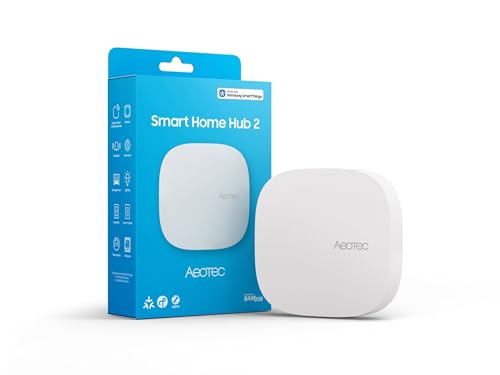
Pros
- Supports modern Matter and Zigbee device protocols
- Local automation execution works during internet outages
- Flexible setup via Wi-Fi or wired Ethernet
Cons
- Lacks Z-Wave support for legacy smart devices
- Users with existing Z-Wave setups should skip it
Understanding the distinction between these two pieces of equipment comes down to control depth and wireless translation. A bridge acts as a dedicated translator, converting proprietary or specialized radio signals into standard Wi-Fi traffic so your home router can recognize them. A hub does that translation work while also functioning as the brain of your setup, storing automation rules and coordinating actions across multiple device types.
Protocol Support and Ecosystem Variety
Bridges typically handle a single transmission method designed for a specific product family. For instance, a dedicated lighting bridge translates Zigbee commands exclusively for its own branded lights and accessories. Once you introduce door locks, climate sensors, or wall switches from different manufacturers, that bridge cannot manage them.
In contrast, a multi-protocol hub coordinates disparate communication standards. The Smart Home Hubs category includes models like the Aeotec Smart Home Hub2 – V4, which supports both Zigbee and the newer Matter standard. This multi-standard capability lets you bind different brands together without purchasing independent translator boxes for each one. Before buying, inventory your existing gear to confirm whether you need multi-standard radio support or a single brand path.
Local Processing vs Cloud Dependency
Many basic bridges rely heavily on cloud servers to run your routines. When you press a wireless button, the bridge sends a signal across your router to an internet server, which then sends the response back to turn on your lamp. If your internet connection drops, routines tied to the cloud stop functioning entirely.
Dedicated hubs focus on local intelligence. The Aeotec Smart Home Hub2 – V4 executes automations directly on the device itself, allowing lighting schedules and sensor triggers to run even when your home loses external web access. If you want lower response latency and reliable offline routines, prioritize controllers with on-board execution capabilities. You can explore our guide on the best smart home hub without subscription options to see how local execution keeps ongoing ownership straightforward.
Network Connection and System Expansion
How a device joins your home network influences overall stability. Many entry-level bridges require a physical connection to your router using a network cable, which can crowd your router shelf. Advanced hubs provide flexible placement by supporting both wired Ethernet and 2.4 GHz or 5 GHz Wi-Fi connections.
Wired Ethernet delivers the lowest transmission jitter, which is helpful if you run dozens of sensors reporting battery status and temperature. Wi-Fi connection options give you freedom to place the central controller in the geographic middle of your home, extending your wireless mesh coverage. To learn how dedicated wireless standards contrast with standard home networking, review our breakdown on smart home hub vs Wi-Fi setups.
Automation Depth and Cross-Brand Coordination
A basic bridge offers limited automation, often restricted to timers or actions involving products within its own brand ecosystem. If you want an opening door sensor from one brand to trigger a wall switch made by another, a single-brand bridge cannot bridge that gap without external third-party software.
A full hub provides multi-condition logic. Using the SmartThings platform on the Aeotec Smart Home Hub2 – V4, you can build routines based on time, presence, motion, and temperature across thousands of certified components. If your goal is basic light scheduling, a bridge suffices. If you want cohesive routines across your entire living area, a hub is necessary.
Missing Radio Protocols and Compatibility Limits
Not every hub supports every wireless standard. When shopping, check product listings carefully for protocol exclusions. For example, while the Aeotec Smart Home Hub2 – V4 includes Zigbee and Matter, the manufacturer listing specifies that Z-Wave is not supported. If you already own Z-Wave deadbolts or in-wall switches, this model will not pair with them directly.
Verifying exclusions beforehand prevents frustration during setup. If your collection relies on specialized protocols, compare controller types in our guide on smart home hub vs gateway systems before finalizing your equipment selection.
How We Evaluated Network Controllers
Our evaluation is based on research into manufacturer technical listings, stated protocol specifications, and real-world customer feedback. We examined radio standards, cross-platform compatibility with voice platforms like Amazon Alexa and Google Assistant, local versus cloud automation capabilities, and installation flexibility. By analyzing documented compatibility constraints, we identify practical strengths and limitations for each category of smart home user.
Which Option Fits Your Needs?
Choosing between these device types depends on whether you are building a unified multi-brand smart home or managing a single set of specialized accessories.
For Multi-Brand Homes and Local Control:
The Aeotec Smart Home Hub2 – V4 is well suited for homeowners and apartment dwellers who want to combine Zigbee sensors, Matter accessories, and mainstream voice assistants under the SmartThings umbrella. It offers local automation processing and setup flexibility through Wi-Fi or wired Ethernet.
Pros:
- Supports Zigbee and Matter protocols for cross-brand accessory pairing.
- Executes local automations so routines run without an active web connection.
- Offers flexible placement with both Wi-Fi and wired Ethernet network options.
- Integrates directly with Amazon Alexa and Google Assistant.
Cons:
- Lacks Z-Wave support, excluding existing Z-Wave switches and locks.
- Initial setup requires pairing through the SmartThings app.
Who should skip it: Skip this model if your existing installation relies heavily on Z-Wave accessories, as it cannot communicate on that wireless frequency.
For Single-Brand Lighting Setups:
If your smart home plans are limited to a single brand of lighting, a dedicated proprietary bridge remains a sensible choice. Dedicated bridges keep setup simple for their specific ecosystem, though you sacrifice the ability to coordinate different brands under one local automation engine.
Frequently Asked Questions
Can a smart home hub completely replace a brand-specific bridge?
In many cases, yes. A multi-protocol hub supporting Zigbee and Matter can pair directly with compatible lights and sensors, removing the need for a standalone bridge. However, certain brand-specific features, such as custom entertainment lighting sync modes, may still require that manufacturer’s proprietary bridge.
Do smart home hubs work without an active internet connection?
Hubs with local processing capabilities, such as the Aeotec Smart Home Hub2 – V4, continue executing routines locally during an internet outage. However, you will not be able to control devices remotely from outside your home or receive push notifications until internet service resumes.
What is the primary trade-off when choosing a bridge over a hub?
The primary compromise is ecosystem lock-in. A bridge is inexpensive and simple to set up for one product family, but it cannot coordinate routines with accessories from competing brands, leaving you with multiple apps and separate controllers.
Does the Aeotec Smart Home Hub2 – V4 support Z-Wave devices?
No. The Aeotec Smart Home Hub2 – V4 listing explicitly specifies that Z-Wave is not supported. It supports Zigbee, Matter, Wi-Fi, and wired Ethernet connections.
Do hubs connect to Amazon Alexa and Google Assistant?
Yes, hubs powered by SmartThings integrate with both Alexa and Google Assistant. This link lets you use voice commands to operate paired switches, bulbs, and climate controls across your system.
Should I place my hub on Wi-Fi or use an Ethernet cable?
Wired Ethernet provides the most dependable link with zero wireless interference between your controller and router. However, connecting via Wi-Fi allows you to place the hub centrally in your home, which can improve signal strength to distant battery-powered sensors.


Write Your Review
No reviews yet. Be the first to share your experience!