

Apartment smart homes often need to work around crowded Wi-Fi, limited counter space, and rental rules that restrict permanent changes. The Best Smart Home Hub for Apartment guide compares three options by supported protocols, ecosystem compatibility, local automation features, and the kind of control each one provides.
A dedicated controller can connect compatible sensors and switches, while a smart display puts voice commands and visual controls in a shared room. Your existing devices and preferred app matter as much as the hub’s feature list, so check compatibility before adding another box to your network.

Pros
- Hands-free control with built-in Google Assistant
- Compact footprint fits easily on counters and nightstands
- Integrates with over 200 smart home devices
- Voice Match delivers personalized user routines
Cons
- Modest 1024x600 display resolution limits fine visual detail
- Users wanting high-definition video displays should skip it
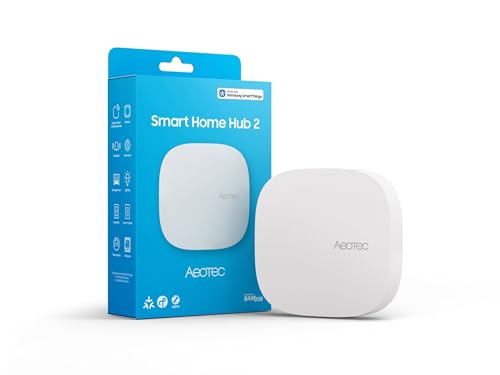
Pros
- Supports modern Matter and Zigbee device protocols
- Local automation execution works during internet outages
- Flexible setup via Wi-Fi or wired Ethernet
Cons
- Lacks Z-Wave support for legacy smart devices
- Users with existing Z-Wave setups should skip it

Pros
- Power over Ethernet and dual-band Wi-Fi connectivity
- Matter controller and Thread border router capabilities
- Local automation processing reduces cloud reliance
- Encrypted storage with no microphones or cameras
Cons
- Does not support third-party Zigbee devices
- Required 2A power adapter is not included
- Exposes only one air conditioner through Matter
The Best Smart Home Hubs by Use Case
Best for Google Voice and Visual Controls: Google Nest Hub (1st Gen)
The Google Nest Hub (1st Gen) suits renters who want a screen for Google Assistant, compatible smart home controls, and entertainment in one device. Its 7-inch touchscreen shows items such as weather, calendars, YouTube videos, and Google Photos, while the listing specifies support for more than 200 devices from over 50 brands. It is a voice-first interface rather than a dedicated Zigbee or Thread controller, so it may not replace a separate bridge for devices that use those protocols.
Reasons to buy:
- Touchscreen offers visual controls alongside Google Assistant voice commands.
- Supports listed services including YouTube, Spotify, and Pandora.
- Voice Match can provide personalized calendar, commute, and reminder information.
Reasons to avoid:
- Listing does not specify a Zigbee or Thread radio, so check whether your non-Wi-Fi devices need a separate bridge.
- Smart home voice and app features depend on compatible devices and network access.
Skip it if you need a dedicated multi-protocol controller for sensor networks or want local automation features specified for a standalone hub.
Best for SmartThings and Zigbee Devices: Aeotec Smart Home Hub2 – V4
For renters building routines around compatible sensors, lights, plugs, or switches, the Aeotec Smart Home Hub2 – V4 combines SmartThings control with Zigbee and Matter support. Its listing specifies setup over Wi-Fi or Ethernet and says many local automations can continue when internet service is temporarily unavailable. That local capability is useful for routines that do not depend on cloud services, but the listing does not promise that every automation or notification works offline.
Reasons to buy:
- Combines Zigbee and Matter support for compatible devices.
- Offers Wi-Fi or wired Ethernet setup, giving renters two connection choices.
- Local automation execution can keep some routines running during temporary internet outages.
Reasons to avoid:
- Does not support Z-Wave, so existing Z-Wave devices need another compatible controller.
- Device compatibility and offline behavior can vary by product and automation.
Skip it if your setup depends on Z-Wave devices or you want a touchscreen interface built into the controller.
Best for Aqara and Thread Expansion: Aqara Smart Home Hub M3 for Advanced Automation
The Aqara Smart Home Hub M3 for Advanced Automation is aimed at people using Aqara devices who want local routines and options for connecting compatible Matter and Thread products. The listing specifies support for up to 127 Aqara Zigbee devices and up to 127 Thread devices, with repeaters needed for Thread devices. Those stated limits apply to the described device types, not a promise that every third-party Zigbee product will pair: the listing explicitly limits its Zigbee device capacity to Aqara devices.
Reasons to buy:
- Supports Aqara Zigbee devices and Thread devices, plus Matter bridge functions.
- Local automation is a priority, and Aqara routines can migrate from older Aqara hubs.
- Includes an IR blaster that can control compatible infrared devices, including an air conditioner when paired with an Aqara temperature and humidity sensor.
Reasons to avoid:
- Third-party Zigbee device support is not included in the stated limit; verify each model before buying.
- A 2A USB power adapter is not included, and the listing recommends placing the hub 6 to 19 feet from the router.
Skip it if you want a general-purpose Zigbee hub for devices from many brands or do not plan to use Aqara features.
How to Choose the Best Smart Home Hub for Apartment Use
Match protocols to devices you already own
Protocol support determines which lights, sensors, switches, and other accessories can connect directly to a hub. Matter can help connect products across supported ecosystems, but it does not mean that every product or feature works with every controller. Check the exact device model’s compatibility information in its listing and app documentation before purchase.
The Aeotec hub specifies Zigbee and Matter, but not Z-Wave. The Aqara M3 supports Aqara Zigbee and Thread devices, while its stated Zigbee limit excludes third-party Zigbee devices. The Google display is useful for controlling compatible devices through Google Assistant, but the published specifications do not identify it as a Zigbee or Thread hub.
Choose an ecosystem that fits your phone and devices
Smart home compatibility depends on more than a shared protocol name. A device may appear in one app but expose only some controls in another ecosystem. The Aeotec hub uses SmartThings and lists Alexa and Google Assistant compatibility. Aqara lists support for Apple HomeKit, Alexa, SmartThings, and Home Assistant. Google Nest Hub centers on Google Assistant and Google Home functions.
Before choosing, list the apps and voice assistants you actually use, then confirm that your important devices appear as supported models. For more on connected lighting choices, see our guide to the best smart lighting systems for home. Do not assume that compatibility means every routine or setting transfers between platforms.
Check local automation and internet needs
Local processing can keep some routines operating when your internet connection drops, but it does not guarantee that every smart home feature stays available. The Aeotec listing says many local automations can continue offline. Aqara describes local automation, while noting that some cloud-based notifications still need internet access. The Google display’s published information focuses on Assistant, apps, and smart home integration rather than offline automation.
If your priority is a sensor turning on a light without relying on a cloud service, check that the exact devices and rule can run locally. Confirm which functions stop during an outage, especially remote access, voice assistance, and notifications. Product listings can describe platform capabilities, but individual routines may have different requirements.
Plan the connection and placement
Apartment setups often need to fit around a router, available outlets, and shared living areas. The Aeotec hub supports Wi-Fi or Ethernet, which lets you choose a wireless connection or a wired one if a suitable router port and cable are available. The Aqara M3 specifies dual-band Wi-Fi and PoE, but its listing says the 2A USB power adapter is not included and recommends a 6-to-19-foot distance from the router for a stable connection.
The Google Nest Hub is a display meant to be placed where you can see and speak to it. Consider whether a counter or shelf location suits your daily routine and whether you want a screen in that room. For a standalone hub, verify the included power requirements and the placement guidance in the current listing before ordering.
Review privacy and device-specific limitations
Smart home hubs can store settings, connect household devices, or handle voice requests, so review how each app manages account access and data. Aqara says the M3 has no microphone or camera and includes 8GB of end-to-end encrypted local storage for device lists, configuration parameters, and automation configuration data. Those details may appeal to people who prefer a hub without built-in audio or video hardware.
For the Google display, consider its voice assistant and screen as part of your privacy decision. The published product details do not explain the full data-retention controls, so review Google Home and Assistant settings before setup. For any hub, use a unique account password and enable available account protections.
How We Compared These Apartment Smart Home Hubs
This comparison uses the published product specifications and design details, including listed protocols, ecosystem support, connection choices, voice controls, local automation statements, and privacy features. The published data includes no customer feedback, so the recommendations rely on those listed details rather than reported owner experiences. We prioritize fit for common apartment needs: straightforward voice control, compatible device expansion, and routines that may remain available during an internet interruption.
Frequently Asked Questions
Do I need a separate hub for Zigbee or Thread devices?
That depends on the device and the equipment you already own. The Aeotec Smart Home Hub2 – V4 supports Zigbee and Matter, and the Aqara M3 supports Aqara Zigbee and Thread devices. The published specifications do not list Zigbee or Thread radios for the Google Nest Hub, so check whether your accessories need a separate bridge.
Can the Aeotec Smart Home Hub2 – V4 control Z-Wave devices?
No. Its listing explicitly says Z-Wave is not supported. If you own Z-Wave switches, sensors, or other accessories, choose a controller that specifically lists support for those devices or keep a compatible Z-Wave hub.
Will apartment automations work if the internet goes out?
Some may, depending on the hub, devices, and type of routine. Aeotec says many local automations can continue during a temporary outage, and Aqara describes local automation while noting that some cloud-based notifications still need internet. Remote access and cloud-based voice features may not work normally, so check the requirements for each routine.
Is the Google Nest Hub a full smart home hub?
It provides a touchscreen and Google Assistant controls for compatible smart home devices, but the published specifications do not list Zigbee or Thread support. It can suit a Google-centered setup using compatible devices, while accessories that require another radio may need a separate bridge.
Can the Aqara M3 connect third-party Zigbee devices?
The listing states support for up to 127 Aqara Zigbee devices and specifically excludes third-party Zigbee devices from that capacity. Check Aqara’s current compatibility information for the exact accessory you plan to use rather than assuming that any Zigbee product will pair.
Which hub suits a renter who wants fewer permanent changes?
All three are presented as indoor smart home devices, but the published details do not establish complete installation requirements for every setup. The Google display and Aeotec hub offer Wi-Fi connections; Aeotec also lists Ethernet. Aqara offers Wi-Fi and PoE, with a USB power adapter not included. Check power needs, cable routing, and the product’s placement instructions before choosing.


Write Your Review
No reviews yet. Be the first to share your experience!