

Matter can help smart home devices work across ecosystems, but buying a hub still means checking which protocols it supports and what it can actually connect. This guide to the Best Smart Home Hub for Matter compares three hubs for Aqara device owners, homes that prioritize local automation, and buyers who want an inexpensive starting point.

Pros
- Power over Ethernet and dual-band Wi-Fi connectivity
- Matter controller and Thread border router capabilities
- Local automation processing reduces cloud reliance
- Encrypted storage with no microphones or cameras
Cons
- Does not support third-party Zigbee devices
- Required 2A power adapter is not included
- Exposes only one air conditioner through Matter

Pros
- Runs automations locally without cloud internet reliance
- Supports Matter, Zigbee 3.0, and Z-Wave 800
- No recurring subscription fees for core platform features
- Dedicated external antennas improve wireless mesh coverage
Cons
- Complex Rule Machine tools require a learning curve
- Casual users seeking basic plug-and-play setups should skip it
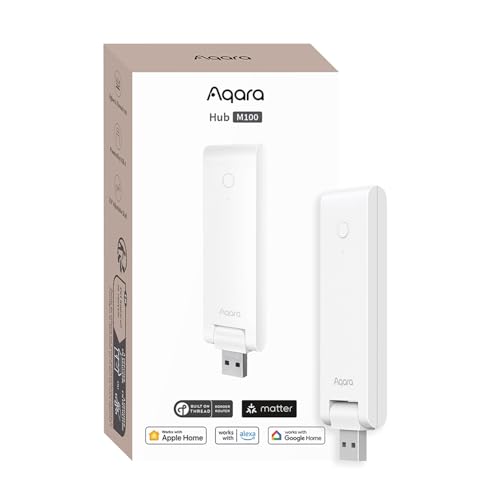
Pros
- Matter bridging integrates Aqara accessories into major ecosystems
- Local automation execution functions without active internet access
- Flexible USB-A stick design pivots up to 210 degrees
- Built-in Thread border router expands mesh connectivity
Cons
- Incompatible with third-party Zigbee hardware
- USB power adapter not included in box
- Capacity limited to twenty Zigbee and twenty Thread devices
The Best Smart Home Hubs by Use Case
These picks serve different needs rather than offering interchangeable ways to control every Matter device. Check whether your existing devices use Matter, Thread, Zigbee, or Z-Wave, and whether you need a Matter controller, a bridge for older devices, or both. For a plain-language comparison of the roles hubs and bridges play, see how a smart home hub differs from a bridge.
Best for Advanced Aqara Automations: Aqara Smart Home Hub M3 for Advanced Automation
The Aqara Smart Home Hub M3 for Advanced Automation suits a home built around Aqara devices that needs both Zigbee and Thread support. Its listing specifies capacity for up to 127 Aqara Zigbee devices and 127 Thread devices, with repeaters needed for Thread devices. It also works as a Matter bridge for supported Aqara features and has local automation, PoE, dual-band Wi-Fi, and an infrared blaster. Aqara Smart Home Hub M3 for Advanced Automation is the most feature-rich Aqara option here, but its advantages matter most if you will use those Aqara-specific functions.
Reasons to buy:
- Supports Aqara Zigbee and Thread devices, with stated capacities of up to 127 for each protocol.
- Runs local automations and can migrate Zigbee devices from older Aqara hubs.
- PoE, dual-band Wi-Fi, encrypted local storage, and an IR blaster give it several connection and control options.
Reasons to avoid:
- Its Zigbee support is for Aqara Zigbee devices, not third-party Zigbee devices.
- The USB-C power adapter is not included, and Thread repeaters are needed for the listed device capacity.
Skip it if you want a low-cost hub or need broad compatibility with third-party Zigbee products; confirm device support before buying.
Best for Local, Multi-Protocol Automation: Hubitat Elevation C-8 Pro Smart Home Hub
The Hubitat Elevation C-8 Pro Smart Home Hub is aimed at people who want complex routines to run locally rather than depend on remote servers. Its listing specifies Matter 1.5, Z-Wave 800 Series with Long Range, Zigbee 3.0, and Bluetooth, plus a rule engine for multi-condition automations. It also lists compatibility with Alexa, Google Home, and Apple HomeKit. Hubitat Elevation C-8 Pro Smart Home Hub makes sense for a mixed-device home where local processing and detailed control matter more than a simple setup.
Reasons to buy:
- Supports Matter, Z-Wave 800 Series, Zigbee 3.0, and Bluetooth in one hub.
- Runs automations locally, according to the listing, and does not require a subscription for full platform functionality.
- Rule Machine supports routines with multiple conditions, and the listing describes compatibility with more than 1,000 devices across more than 100 brands.
Reasons to avoid:
- The extensive rule engine and broad device support may take more setup than a hub focused on one product family.
- Check that each device and integration you plan to use is supported; general platform compatibility does not guarantee that every feature works across ecosystems.
Skip it if you want a small, low-cost Aqara-focused bridge and do not need Z-Wave or advanced local rules.
Best Budget Aqara Hub: Aqara Smart Hub M100 for Home Automation
The Aqara Smart Hub M100 for Home Automation offers a lower-cost route to Aqara Zigbee and Thread support, with Matter bridging for compatible Aqara products. The listing specifies support for up to 20 Aqara Zigbee devices and 20 Thread devices, plus local automation for Zigbee and Matter devices. Its USB-A power connection and adjustable shaft give buyers flexible placement options, though the required power adapter is not included. Aqara Smart Hub M100 for Home Automation fits a smaller Aqara setup better than the M3, provided its device limits and Wi-Fi needs suit your home.
Reasons to buy:
- Supports Aqara Zigbee and Thread devices, with listed limits of 20 devices for each.
- Acts as a Matter bridge for supported Aqara products and offers local automation.
- Uses 2.4GHz Wi-Fi 6 and USB-A power; the listing says it can connect to a power bank, outlet, PC, or router.
Reasons to avoid:
- It does not support third-party Zigbee devices, and its stated Zigbee and Thread capacities are lower than the M3’s.
- A 5V, 0.5A power adapter is not included, and the hub needs continuous power.
Skip it if you need Z-Wave, third-party Zigbee support, or capacity beyond its listed device limits.
How to Choose the Best Smart Home Hub for Matter
Matter support is one part of the compatibility check, not a promise that a hub will replace every bridge or work with every device. Compare protocol support, the hub’s role in your ecosystem, automation behavior, and practical setup requirements against the devices you already own.
Check whether you need a Matter controller or a bridge
A Matter controller manages compatible Matter devices in an ecosystem. A Matter bridge exposes supported devices using another protocol, such as a manufacturer’s Zigbee products, to a Matter ecosystem. Some products can perform both roles, but supported devices and functions vary. The Aqara M3 and M100 are described as Matter bridges for Aqara products, while their listings also identify them as Matter controllers. Confirm that the specific product appears on the compatibility information for your chosen app and smart home platform.
Do not assume that a bridge makes every feature available everywhere. For example, the M3 listing says some Aqara-exclusive scenes and signals can sync with Matter ecosystems, but also notes that functionality can vary by Matter integration app. If a routine depends on a specific sensor state, scene, or device control, verify that exact function before choosing a hub.
Match wireless protocols to your devices
List the protocols used by your current lights, locks, sensors, and switches. Matter is an interoperability standard, while Thread, Wi-Fi, Zigbee, and Z-Wave describe separate ways devices connect. A hub with Matter support may not include every radio or bridge your existing products need. The Hubitat model lists Matter, Z-Wave, Zigbee, and Bluetooth, while the Aqara models focus on Aqara Zigbee and Thread.
Also check the boundaries of support, not only protocol names. Both Aqara hubs specify that their Zigbee support excludes third-party Zigbee devices. The M3 has a higher listed device capacity than the M100, but those figures do not establish that every supported device will work with every automation or ecosystem. For a broader explanation of how hubs relate to network connections, read the difference between a smart home hub and Wi-Fi.
Decide how much local automation you need
Local automation can keep some routines running when internet access is unavailable, but cloud-dependent features may still stop working. The Hubitat listing says automations run on the hub. Aqara says both hubs support local automation, while noting that some cloud notifications still need an internet connection. Check which actions must keep working during an outage, then verify that the hub handles those actions locally.
Complex routines also affect setup. Hubitat’s Rule Machine is aimed at multi-condition logic and detailed routines. Aqara’s hubs can be a more focused choice if your devices and automations center on Aqara products. If avoiding a recurring subscription is a priority, compare the platform terms with these subscription-free hub considerations; the Hubitat listing says its full platform functionality does not require a subscription.
Verify ecosystem and app compatibility
Check compatibility with your preferred controller app and voice assistant, then confirm that the devices you want to expose are supported. Hubitat lists Alexa, Google Home, and Apple HomeKit compatibility. The Aqara products list support for Apple Home, Alexa, and other integrations, including Home Assistant, but specific functions can depend on the integration method. A broad ecosystem label does not mean every device feature transfers.
For Apple Home users considering the M3’s infrared control, pay attention to the listing’s qualification: exposing an air conditioner to Matter uses Matter integration rather than HomeKit integration, and only one AC device can be exposed to Matter. The M3 listing also says an Aqara temperature and humidity sensor is needed for its AC thermostat function. Check these details against your intended setup before relying on that feature.
Plan power and placement before setup
A hub needs a stable power source and a useful location for its wireless connections. The M3 offers PoE as well as Wi-Fi and includes a mount and screws according to its listing, but its USB-C power adapter is not included. The M100 uses USB-A for power and needs a separate 5V, 0.5A adapter; its listing says to keep it continuously powered. Both Aqara listings recommend placing the hub 6 to 19 feet from the router to support a stable connection.
Placement can also affect mesh devices. The M3’s stated Thread capacity notes that repeaters are needed, so do not treat the maximum as a guarantee for a home without the needed network conditions. If your home uses several wireless standards or has a large layout, review the hub’s connection options and the device maker’s placement guidance. Our guide to smart home hubs versus gateways explains why network roles matter when planning a system.
How We Compared
This comparison uses the published product listings, including protocol support, stated device capacities, ecosystem compatibility, power details, privacy information, and automation features. We considered how those details align with distinct buyer needs, such as Aqara-focused control, local routines, and a smaller entry-level setup. Ratings and review counts were not used to infer recurring owner experiences.
Frequently Asked Questions
Does a Matter hub make every smart home device compatible?
No. Matter support does not automatically add support for every device, protocol, or feature. Check the hub’s listed protocols and confirm that the specific device and functions you need are supported by the hub, app, and Matter ecosystem you plan to use.
Can the Aqara M3 or M100 connect third-party Zigbee devices?
The published listings specify Aqara Zigbee support and explicitly exclude third-party Zigbee devices. If you already own Zigbee products from another brand, verify compatibility independently rather than assuming that the Matter bridge will connect them.
Which of these hubs is suited to Apple Home?
All three listings include Apple Home or HomeKit compatibility. That does not establish that every connected device or feature works in Apple Home. The M3 listing gives a specific caveat for exposing its infrared-controlled AC to Matter, so check the integration method and supported controls for your intended devices.
Will local automations work without internet access?
The product listings describe local automation for all three hubs, with Hubitat emphasizing local processing. Some services may still rely on the cloud: Aqara notes that certain notifications require internet access. Verify each routine’s behavior, especially if alerts or remote access matter during an outage.
What is the main difference between the Aqara M3 and M100?
Both support Aqara Zigbee and Thread and bridge supported Aqara devices to Matter ecosystems. The M3 lists higher device capacities, PoE, dual-band Wi-Fi, encrypted local storage, and an infrared blaster. The M100 has lower stated capacities, 2.4GHz Wi-Fi 6, and USB-A power. Choose based on the features and device limits your setup needs, not on Matter support alone.
Do these hubs need separate power adapters?
The M3 listing says its 2A USB power adapter is not included, and the M100 listing says its 5V, 0.5A adapter is not included. The M3 also has a PoE port, while the M100 can draw power through USB-A. Check the power method you intend to use and keep the M100 continuously powered.



Write Your Review
No reviews yet. Be the first to share your experience!