

Pilots choosing an iPad mini case need to weigh protection and handling against cockpit space, screen access, and secure stowage. This guide compares two cases for the best iPad mini case for pilots, focusing on their listed protection, grip, stand, and Pencil features.
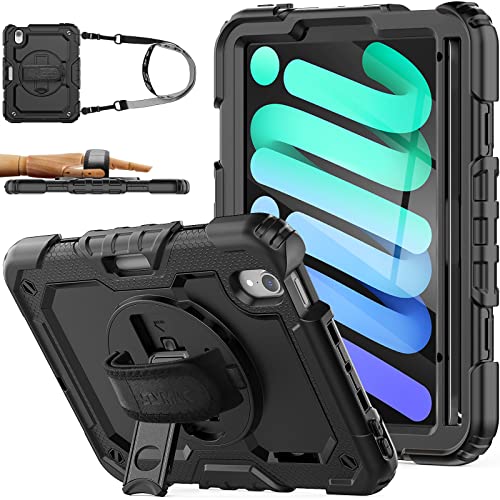
Pros
- Built-in screen protector
- Three stand angles
- Hand and shoulder straps included
- Port plugs included
Cons
- Who should skip it: owners of other iPad models

Pros
- Tri-fold viewing and typing positions
- Built-in Pencil holder supports magnetic charging
- Flexible TPU back for scratch and bump protection
Cons
- Pencil not included
- Who should skip it: buyers with other iPad models
The Best iPad Mini Cases by Use Case
Best for a Secure Handheld Grip: SEYMAC stock Case for iPad mini 7 (A17 Pro)
The SEYMAC stock Case for iPad mini 7 (A17 Pro) suits pilots who value a hand strap and a built-in screen protector. Its listing describes a rotating hand strap, a kickstand with three stated viewing angles, and a shoulder strap for carrying. The listing also claims shock-absorbing protection, but that claim does not establish aviation approval or protection under every impact condition. Our iPad case guide covers broader fit and protection considerations.
Reasons to buy:
- The rotating hand strap gives you a way to hold the tablet while viewing charts or documents.
- The built-in screen protector adds a protective layer without needing a separate screen protector listed as an extra purchase.
- The kickstand is listed for viewing, drawing, video, and typing at 30°, 45°, and 60° angles.
Reasons to avoid:
- The hand strap, shoulder strap, and protective construction may take up more space than a slim folio-style case.
- The listing does not specify case dimensions, weight, screen-protector material, or whether the stand suits a particular cockpit mounting arrangement.
Skip it if you want a low-profile cover or need a case confirmed to fit a specific aircraft mount.
Best for a Slim Folio Design: JETech Case for iPad mini A17 Pro/6th Gen
The JETech Case for iPad mini A17 Pro/6th Gen is a more conventional folio option, with a flexible TPU back, a tri-fold cover, and a Pencil holder. The listing specifies auto-wake and sleep support and says the holder supports magnetic Pencil charging when the Pencil is stored there. Its slim-profile description may appeal if you prefer a cover that folds into viewing or typing positions rather than a hand strap. The listing does not provide a built-in screen protector.
Reasons to buy:
- The tri-fold cover props the iPad mini for viewing or typing, according to the listing.
- The Pencil holder keeps a compatible Pencil stored with the case, and the listing says magnetic charging is supported while it is in the holder.
- The magnetic cover supports automatic wake and sleep, which can make routine opening and closing more convenient.
Reasons to avoid:
- The listing describes protection against scratches and bumps, not the same full-body protection claim or built-in screen protector offered by the SEYMAC case.
- The Pencil is not included, and the listing does not identify its model compatibility beyond the stated holder and charging feature.
Skip it if you want an integrated screen protector, a hand strap, or a shoulder strap.
How to Choose the Best iPad Mini Case for Pilots
Confirm your iPad mini model
Case openings and dimensions must match the tablet generation. Both listings identify compatibility with iPad mini A17 Pro models from 2024 and iPad mini 6 models from 2021, with model numbers A2993, A2995, A2996, A2567, A2568, and A2569. Check the model number on the back of your iPad or in its settings before ordering. Do not assume that a case for another iPad mini generation will fit because the screen size looks similar.
The compatibility details are a useful starting point, but they do not answer every fit question. If you use a cockpit mount, compare the case’s outer dimensions and attachment method with the mount maker’s fit requirements. Neither listing supplies dimensions or states compatibility with a particular mount, so confirm that point before relying on the case in flight.
Choose grip and carrying features for your routine
A rotating hand strap can help when you need to hold the iPad rather than rest it on a surface. The SEYMAC listing includes a soft handle strap and a separate shoulder strap. These features may suit carrying between locations or holding the tablet during noncritical tasks, but the listing does not establish that either strap is suitable for use during every phase of flight.
The JETech folio takes a different approach: a slim-profile case with a folding cover rather than a hand strap. That design may be easier to handle like a traditional tablet cover, while offering less in the way of dedicated carrying and grip features. Consider where you store the iPad, whether you need one-handed handling, and whether straps interfere with your mount or other equipment.
Compare screen coverage and protection claims
The SEYMAC listing specifies a built-in screen protector and describes the case as shock-absorbing and protective against hits, drops, shocks, and bumps. These are manufacturer claims, not a guarantee of a particular outcome. The product information does not identify a protection standard or provide impact measurements. Treat those claims as design guidance, not proof that the tablet will remain undamaged after any drop.
JETech lists a flexible TPU inner back and a PU front and back cover surface, with protection against scratches and bumps. Its listing does not specify a built-in screen protector. If you choose this case, decide whether you want a separate protector and verify that it works with your display needs and any accessories. Neither product listing gives enough information to compare screen clarity, glare, or touch response through a protector.
Check stand positions and cockpit visibility
Both cases offer ways to prop up the tablet, but their stands differ. SEYMAC lists a rotating kickstand with 30°, 45°, and 60° positions. JETech uses a tri-fold front cover for viewing and typing positions, but its listing does not give specific angles. If you plan to use either stand in an aircraft, verify that it rests securely on your intended surface and does not block instruments, controls, airflow, or your view.
These cases are tablet covers, not described as aviation mounts or flight-deck equipment. The product details do not state that either case is certified or approved for cockpit use. Follow your aircraft’s procedures and applicable aviation guidance for tablet placement and use; do not treat a kickstand or strap as a substitute for a suitable mount or secure stowage.
Decide whether Pencil storage matters
Both cases list a Pencil holder, so storage may be useful if you annotate documents or use a stylus. JETech specifically states that magnetic Pencil charging is supported in the holder while the Pencil is stored. Its listing also says the Pencil is not included. SEYMAC lists a Pencil holder, but its published details do not specify charging support. If charging while stored matters, verify the Pencil model and charging behavior with the listing before buying.
How We Compared
This comparison uses the published product listings, including stated iPad model compatibility, case design, protection features, straps, stands, and Pencil storage. We also considered the available rating information, but the published data provides no written customer feedback to assess. Where specifications such as dimensions, mount compatibility, or screen-protector material were not supplied, we identify them as details to verify rather than infer them.
Frequently Asked Questions
Will these cases fit both iPad mini 6 and iPad mini A17 Pro?
Both listings state compatibility with iPad mini 6 and iPad mini A17 Pro models, and list model numbers A2993, A2995, A2996, A2567, A2568, and A2569. Check your iPad’s exact model number against the listing before purchase. Similar screen size alone does not confirm compatibility.
Which case offers more built-in screen protection?
The SEYMAC listing explicitly includes a built-in screen protector. The JETech listing describes a front cover but does not specify an integrated screen protector. Check the full listing and consider whether you want a separate protector if choosing JETech.
Can I use either case with my cockpit mount?
Neither product listing confirms compatibility with a particular cockpit mount. Compare the case’s fit and attachment requirements with your mount, and verify dimensions or clearance with the manufacturers. Do not assume the listed kickstand or folio stand will secure the tablet in an aircraft.
Does the JETech case include an Apple Pencil?
No. The listing says the Pencil is not included. It describes a built-in holder and says magnetic Pencil charging is supported while the Pencil is stored there. Verify compatibility with your specific Pencil before relying on that feature.
Which case is easier to carry by hand?
SEYMAC lists a rotating hand strap and a shoulder strap, which provide dedicated carrying options. JETech lists a slim-profile folio design without a hand or shoulder strap. Which feels easier depends on your preferred grip and storage routine; the published information does not include weight or dimensions for a direct portability comparison.
Are these cases approved for aviation use?
The published product information does not state that either case is aviation-approved or certified for cockpit use. Check your aircraft procedures and mount requirements, and keep the tablet from obstructing controls, instruments, or visibility.


Write Your Review
No reviews yet. Be the first to share your experience!