

A tablet that looks good for streaming still needs to fit where and how you watch. A larger screen can make movies easier to enjoy from a stand or across a room, while a lighter, smaller model may be easier to carry. Speaker design, display resolution, storage, operating system, and streaming-service compatibility also shape the experience.
This guide compares the Best Tablet for Watching Movies by those practical needs. The listed details point to different strengths: a refurbished 10.1-inch Full HD Fire tablet, a 13.4-inch Android tablet with a 120Hz display, and two 11-inch options with quad speakers.

Pros
- Crisp 10.1-inch 1080p Full HD screen
- Expandable storage up to 1 TB via microSD
- Durable build using strengthened aluminosilicate glass
- Built-in parental controls through Amazon Kids
Cons
- Compatible stylus pen sold separately
- May arrive in generic Amazon packaging
- Amazon Kids+ content requires paid subscription

Pros
- Large 13.4-inch display with smooth 120Hz refresh rate
- Integrated 4G LTE and GPS for mobile connectivity
- Expandable storage up to 1TB via microSD card
- Includes 3.5mm headphone jack and factory-installed screen protector
Cons
- Relatively heavy at 1.59 pounds for handheld use
- Who should skip: buyers needing a compact, lightweight tablet

Pros
- Generous 256GB storage paired with 8GB RAM
- Fluid 11-inch display with 90Hz refresh rate
- Immersive quad speakers with Dolby Atmos
- Slim 0.27-inch profile weighing 1.05 pounds
Cons
- Power users needing workstation performance should skip it
- Large 11-inch footprint limits easy one-handed operation
Pros
- Sharp 11-inch 2.5K display with 90Hz refresh rate
- Included Tab Pen stylus and folio case
- Large 256GB internal storage and 8GB memory
- Quad speakers tuned with Dolby Atmos
Cons
- 20W wired charging speed limits quick battery refills
- Demanding 3D gamers should skip entry-level graphics chip
The Best Tablets by Use Case
Best Budget: Amazon Fire HD 10 tablet, built for relaxation
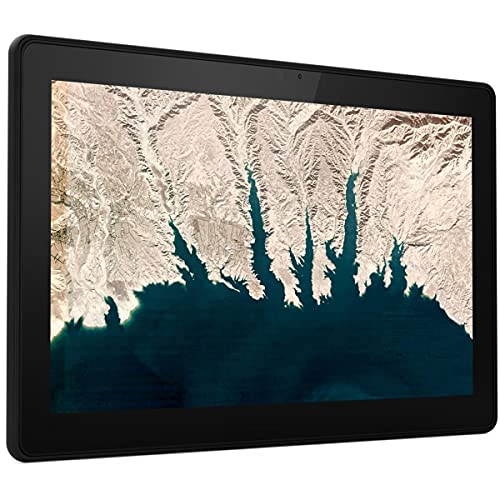
The Amazon Fire HD 10 tablet, built for relaxation suits viewers who want a Full HD screen in a straightforward entertainment tablet. Its 10.1-inch 1080p display gives movies a defined picture, and its listing describes the device as refurbished, certified to look and work like new, and backed by the same limited warranty as a new device. That refurbished status is important: confirm the exact storage variant and warranty terms shown on the listing before buying.
Reasons to buy:
- 10.1-inch 1080p Full HD display for streaming video.
- Storage listed as 32 or 64 GB, with microSD expansion up to 1 TB; microSD card sold separately.
- Amazon Kids parental controls may suit households sharing the tablet with children.
Reasons to avoid:
- This listing describes a refurbished device, not a new unit, and says packaging may be generic.
- The published feature details conflict on memory, so check the exact listing variant rather than relying on an assumed RAM figure.
Skip it if you want a new tablet or need confirmed details about the exact memory configuration before purchase.
Best for a Large Viewing Area: TECLAST T65 13.4" Android16 4G Tablet
The TECLAST T65 13.4" Android16 4G Tablet is the largest-screen choice in this group. Its listing specifies a 13.4-inch IPS display with 1920 × 1200 resolution and a 120Hz refresh rate. The extra screen area can help when you watch from a stand or share a video, though the listed 720-gram weight makes it less suited to holding for long movie sessions than a smaller tablet may be.
Reasons to buy:
- 13.4-inch display provides the largest stated viewing area among these picks.
- 128 GB internal storage and support for expansion up to 1 TB, according to the listing.
- Listing specifies 4G LTE, dual-band Wi-Fi, and an 8,000mAh battery for mobile use.
Reasons to avoid:
- At a listed 720 grams, it may feel cumbersome for handheld viewing.
- Streaming-service support and video playback quality are not established by the published specifications. Confirm that your required apps support this model and its Widevine L1 claim.
Skip it if you prioritize a compact tablet for watching in bed or carrying in a small bag.
Best for Built-In Movie Audio: Samsung Galaxy Tab A11+ 8GB RAM, 256GB Storage
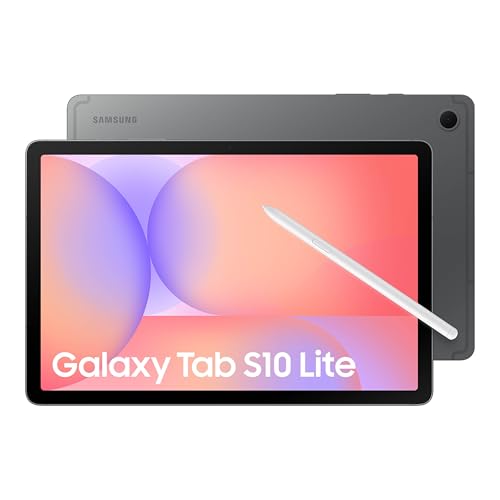
The Samsung Galaxy Tab A11+ 8GB RAM, 256GB Storage stands out for its stated quad speakers powered by Dolby Atmos. That speaker setup may appeal if you often watch without headphones, while the 11-inch display and refresh rate up to 90Hz also suit general streaming and browsing. The listing does not specify the screen resolution, so picture detail cannot be compared directly with the Full HD or 2.5K figures provided for other models.
Reasons to buy:
- Quad speakers powered by Dolby Atmos are a clear audio feature for movie playback.
- Up to 8 GB of memory and 256 GB of storage are listed for multitasking and larger files.
- Expandable storage and fast charging are stated features; check supported card and charging details on the listing.
Reasons to avoid:
- The published product details do not state screen resolution or battery capacity.
- At 11 inches, it offers less viewing area than the TECLAST T65.
Skip it if you need a confirmed high-resolution screen specification or the largest display in this comparison.
Best for Study and Streaming: Lenovo Idea Tab – College Tablet
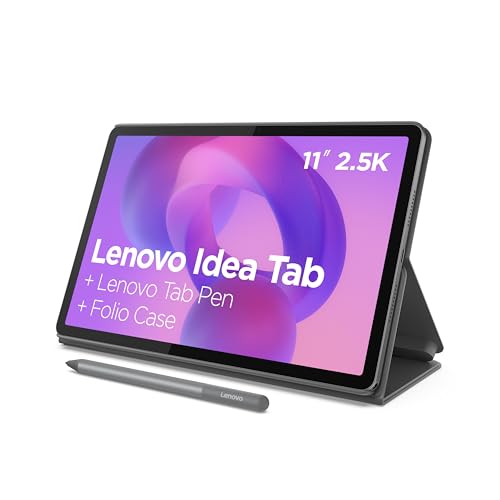
The Lenovo Idea Tab – College Tablet combines an 11-inch 2.5K IPS touchscreen with a 90Hz refresh rate and quad Dolby Atmos-tuned speakers. Those listed features make it a practical fit for someone who watches shows between study sessions and also wants a sharper stated resolution than the Samsung listing provides. The tablet listing also names a Tab Pen and folio case, but check the current package details to confirm included accessories for the specific offer.
Reasons to buy:
- 11-inch 2.5K IPS display and 90Hz refresh rate are specified.
- Quad Dolby Atmos-tuned speakers support viewing without relying on headphones.
- Listing states up to 12 hours of YouTube playback and includes study-focused features and apps.
Reasons to avoid:
- The up-to-12-hour figure is a manufacturer claim for YouTube playback, not a guaranteed runtime for every app or setting.
- Confirm whether the Tab Pen and folio case are included in the exact package you select.
Skip it if you want a tablet mainly for streaming and do not need its study tools or pen-related features.
How to Choose the Best Tablet for Watching Movies
Screen size, resolution, and refresh rate
Screen size affects how immersive a movie feels and how easy the tablet is to carry. The TECLAST T65 has the largest listed display at 13.4 inches, while the other models have screens around 10 or 11 inches. A larger screen can be more comfortable for shared viewing or a stand, but may be tiring to hold for a full film.
Resolution helps describe image detail, but it does not tell the whole story about brightness, contrast, or color. The Amazon Fire HD 10 specifies 1080p Full HD, the TECLAST lists 1920 × 1200, and the Lenovo lists 2.5K IPS. Samsung’s published details omit resolution. Refresh rates of 90Hz or 120Hz can make menus and scrolling look smoother; they do not by themselves prove that movies will look sharper or that a streaming service will deliver high-resolution video.
Speakers and headphone plans
If you watch in a quiet room without headphones, built-in speakers matter. Samsung specifies quad speakers powered by Dolby Atmos, and Lenovo lists quad Dolby Atmos-tuned speakers. The published details do not give speaker counts for the Amazon or TECLAST models, so compare their listing information if tablet audio is a deciding factor.
For shared rooms, a tablet speaker may be less suitable than headphones because nearby people can hear the film. Check whether your preferred headphones connect in the way you need. The TECLAST listing specifically names a 3.5mm jack; the other published descriptions do not establish whether they have one. Do not assume a port or wireless audio feature without checking the exact model details.
Streaming apps, operating system, and video support
Screen resolution only helps if the streaming service, app, and tablet support the playback quality you want. The TECLAST product title and listing mention Widevine L1, but the published data does not confirm app-by-app compatibility or a particular playback resolution. Verify the streaming services you use, their device requirements, and any regional restrictions before choosing.
The Fire tablet is an Amazon device, while the TECLAST listing specifies Android 16, and the Samsung and Lenovo descriptions identify Galaxy Tab and Lenovo tablet software without giving full operating-system details. Check app availability, parental controls, and how you prefer to manage downloads. For more options across the category, browse our Best Tablets collection.
Storage, expansion, and offline downloads
Downloaded films use storage, so capacity matters if you watch away from Wi-Fi or keep several large files on the tablet. The published listings state 32 or 64 GB for the Fire, 128 GB for TECLAST, and 256 GB for Samsung and Lenovo. Fire and TECLAST list microSD expansion, while Samsung lists expandable storage without specifying the supported card capacity in the provided details. Confirm exact variants and expansion limits before buying.
Streaming over Wi-Fi avoids storing every title locally, but travel can make downloads useful. The TECLAST listing additionally specifies 4G LTE, although using mobile data for video may depend on a separate service plan and coverage. Do not assume cellular connectivity is included with a data plan.
Battery, weight, and where you watch
For couch viewing, weight and battery claims can matter more than a small difference in refresh rate. TECLAST lists an 8,000mAh battery and a 720-gram body; Lenovo states up to 12 hours of YouTube playback. These are product specifications and manufacturer claims, not guaranteed movie runtimes. Screen brightness, network use, app choice, and audio volume can affect how long a charge lasts.
Think about whether the tablet will sit on a desk, rest on your lap, or travel in a bag. The larger TECLAST display favors viewing area, while the smaller listed screens may be easier to position in tighter spaces. If note-taking also matters, compare our tablet guide for handwritten notes and stylus use and budget tablets with pen support.
How We Compared
This comparison uses the published product listings, including display size and resolution, stated speaker features, storage and expansion details, battery information, connectivity, and listed accessories. We also considered the provided rating fields, but each product shows zero reviews, so customer feedback offers no basis for comparing reported ownership experiences. Where information is missing or conflicting, such as Fire memory details or Samsung display resolution, the guide identifies the gap rather than filling it with an assumption.
Frequently Asked Questions
Is a 13.4-inch tablet better for movies than an 11-inch model?
It gives you a larger viewing area, which can be useful on a stand or when sharing a screen. It can also be less convenient to hold and carry. Choose based on where you watch most often, and compare weight as well as screen size.
Does a 120Hz display improve movie quality?
A 120Hz refresh rate describes how often the display can refresh, and may make scrolling and interface motion appear smoother. It does not establish streaming resolution, picture quality, or app support. For movie viewing, also check the screen resolution and the service’s supported playback quality.
Which of these tablets has the clearest stated display resolution?
The Lenovo listing specifies an 11-inch 2.5K IPS screen. Amazon states a 10.1-inch 1080p Full HD display, while TECLAST specifies 1920 × 1200. Samsung’s published product details do not state a resolution, so check its current listing if that figure matters to you.
Can I watch movies offline on these tablets?
Offline viewing depends on whether your streaming app supports downloads on that device and whether you have enough free storage. The listings provide storage capacities, but they do not confirm download support for each service. Check the app’s device and download rules before relying on a tablet for travel viewing.
Should I choose built-in speakers or headphones for movie watching?
Built-in speakers are convenient when you watch alone in a quiet room. Samsung and Lenovo specifically list quad-speaker setups, while headphones are usually more considerate in shared spaces. If wired headphones matter, the TECLAST listing specifies a 3.5mm jack; verify connection options for the other models before buying.
Does the Amazon Fire HD 10 listing describe a new tablet?
No. The published information identifies it as a refurbished, certified Like-New device and says it may arrive in generic Amazon-branded packaging. It also states that it comes with the same limited warranty as a new device. Read the exact listing and warranty terms so you know what condition and storage variant you are selecting.


Write Your Review
No reviews yet. Be the first to share your experience!