

Choosing a tablet under $400 can mean picking between a larger screen for coursework, an included pen for notes, or more storage for a shared family device. This guide compares three options by their listed display, memory, storage, processor, battery claims, and included features, so you can match a tablet to your daily tasks.

Pros
- Sharp 12.7-inch 3K display with eye-care modes
- Includes stylus pen and protective folio case
- Efficient MediaTek Dimensity 8300 processor
- Quad JBL speakers with Dolby Atmos audio
Cons
- Base 128 GB storage limits large media collections
- Weighs over 1.3 pounds without the case attached
- Users needing massive local storage should skip it
Pros
- Includes S Pen for precise writing and drawing
- MicroSD expansion supports up to 2TB storage
- Long manufacturer-rated battery life up to 16 hours
- Slim profile at 0.26 inches thick
Cons
- Standard LCD panel instead of premium display technology
- Demanding mobile gamers and power users should skip it

Pros
- Generous 256GB storage paired with 8GB RAM
- Fluid 11-inch display with 90Hz refresh rate
- Immersive quad speakers with Dolby Atmos
- Slim 0.27-inch profile weighing 1.05 pounds
Cons
- Power users needing workstation performance should skip it
- Large 11-inch footprint limits easy one-handed operation
The Best Tablets by Use Case
Best for Large-Screen Studying: Lenovo Idea Tab Pro with Google Gemini
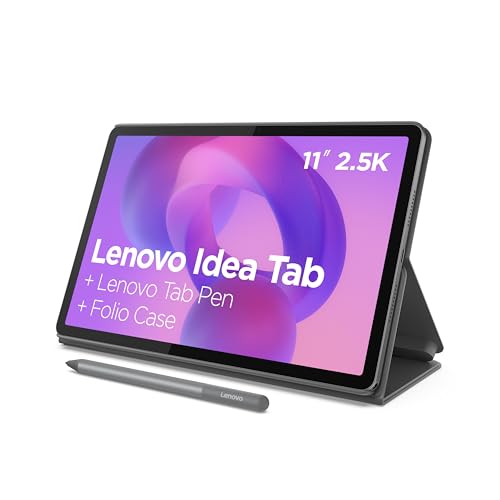
The Lenovo Idea Tab Pro with Google Gemini suits students who want room for reading, coursework, and media on one tablet. Its listed 12.7-inch 3K LCD is the largest screen in this group, and the listing says a Tab Pen Plus and folio case are included. The MediaTek Dimensity 8300, 8 GB of memory, and Wi-Fi 6E also make it the most performance-focused option on paper. The listing claims up to 11 hours of video streaming, though actual battery life depends on use.
Lenovo also lists Google Gemini features and Circle to Search, with the latter usable with a finger or included pen. These tools may help with on-screen research, but availability and compatibility can vary, and Gemini responses should be checked. The larger display can make split-screen reading and note-taking more comfortable, but it also makes this a less compact choice than the 10.9-inch Samsung models.
Reasons to buy:
- 12.7-inch 3K LCD gives documents and video more screen space.
- Listing specifies 8 GB of memory, a Dimensity 8300 processor, and Wi-Fi 6E.
- Tab Pen Plus and folio case are listed as included.
Reasons to avoid:
- The 12.7-inch screen may be less convenient to carry than a smaller tablet.
- Verify app, accessory, and AI-feature compatibility for your intended workflow.
Skip it if you prefer a smaller screen for one-handed reading or want a listed microSD expansion option.
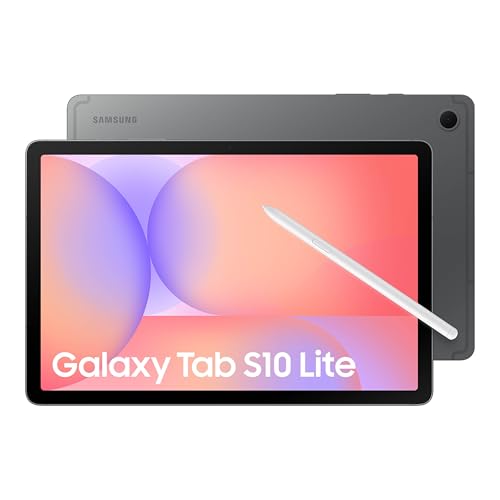
Best for Pen-Based Galaxy Notes: Samsung Galaxy Tab S10 Lite, 6GB RAM, 128GB
The Samsung Galaxy Tab S10 Lite, 6GB RAM, 128GB is a sensible fit if handwriting and drawing matter more than a particularly large display. Samsung lists an included S Pen and a 10.9-inch LCD, so you can annotate, jot down notes, or sketch without treating a separate pen purchase as part of the plan. Its Exynos 1380 processor and 6 GB of memory are listed for everyday activities such as streaming, browsing, note-taking, and multitasking.
The listing claims battery life of up to 16 hours and says a full charge takes about two hours with Super Fast Charging. Those are manufacturer claims, not a guarantee of your results. Samsung also specifies microSD expansion up to 2 TB, which can help if you keep downloaded media or files on the device. Check the exact storage variant and card requirements before buying, since the listing also describes other storage configurations.
Reasons to buy:
- Included S Pen supports note-taking and drawing.
- MicroSD expansion is listed up to 2 TB.
- Circle to Search and other listed Samsung intelligence tools add on-screen assistance.
Reasons to avoid:
- The 10.9-inch LCD offers less workspace than Lenovo’s 12.7-inch screen.
- Confirm whether the listing’s storage and keyboard details match the exact bundle you are considering.
Skip it if you need the largest screen in this comparison or want more than the listed 6 GB of memory.
Best for Shared Family Use: Samsung Galaxy Tab A11+ 8GB RAM, 256GB Storage
The Samsung Galaxy Tab A11+ 8GB RAM, 256GB Storage is aimed at shared everyday use, including browsing, streaming, and casual gaming. Its listed 11-inch display has a refresh rate up to 90 Hz, and Samsung specifies quad speakers with Dolby Atmos. The 8 GB of memory and 256 GB of storage give this configuration more listed capacity than the Tab S10 Lite configuration in this comparison.
Samsung describes the tablet as having expandable storage and fast charging, but the published details do not state the maximum card capacity or a battery-life figure. Verify those specifics if they affect your decision. Unlike the Tab S10 Lite and Lenovo, the published product details do not specify an included pen, so do not assume one comes in the box. Its 11-inch screen sits between the larger Lenovo and the 10.9-inch S10 Lite by stated size.
Reasons to buy:
- Listed 8 GB of memory and 256 GB of storage suit users who keep more apps and files on-device.
- 11-inch screen with refresh rate up to 90 Hz is specified for fluid motion.
- Quad speakers with Dolby Atmos support are listed for movies and music.
Reasons to avoid:
- The published details do not specify an included pen or exact storage expansion limit.
- No numeric battery-life claim is provided in the product information.
Skip it if an included stylus is essential, or if you need a stated battery runtime before choosing.
Best for Gaming-Focused Display Features: Lenovo Idea Tab Pro with Google Gemini
The Lenovo Idea Tab Pro with Google Gemini also stands out for buyers who prioritize gaming-oriented touch and display claims alongside study features. Lenovo’s listing says the tablet is PUBG certified and specifies a 360 Hz touch sampling rate and up to 90 fps. These details may appeal to players who value responsive touch input, but they do not establish performance across every game or setting. Check that your preferred games support the features and frame rates you expect.
The 12.7-inch 3K LCD and quad JBL speakers with Dolby Atmos also make the Lenovo a plausible choice for streamed entertainment between gaming sessions. Its supplied pen and folio case add study and note-taking uses, although the large display is not as compact as the Samsung alternatives. This is the same Lenovo model covered above, considered here for a distinct use case rather than a separate product choice.
Reasons to buy:
- Listing specifies a 360 Hz touch sampling rate and up to 90 fps for its stated gaming use.
- Quad JBL speakers with Dolby Atmos are listed for video and games.
- Included pen and folio case extend use beyond gaming.
Reasons to avoid:
- Gaming claims do not confirm performance in every title or at every setting.
- The large display may be less comfortable to carry than a smaller tablet.
Skip it if your main priority is compact reading, or if you need verified game-specific performance rather than listed feature claims.
How to Choose the Best Tablet Under $400
Match screen size to where you use the tablet
Screen size affects how much content fits on screen and how easy the tablet is to carry. The Lenovo’s listed 12.7-inch display offers more room for lecture notes, documents, and video than the Samsung options at 10.9 and 11 inches. If you regularly read in bed or move between classes, a smaller tablet may feel easier to handle. Compare the stated diagonal size with your typical bag, desk, and reading position rather than assuming that larger always means better.
Resolution and panel type also matter, but the published listings do not provide comparable resolution details for all three tablets. Lenovo specifies a 3K LCD; Samsung specifies LCD screens. If fine text or color work matters, check the full listing for resolution and other display details before choosing. Refresh rate is a separate consideration: the A11+ listing states up to 90 Hz, while Lenovo lists gaming-specific touch and frame-rate claims.
Decide whether an included pen is worth prioritizing
A pen can make handwritten class notes, annotations, and sketches easier than typing with a touchscreen keyboard. The Lenovo listing includes a Tab Pen Plus, and the Galaxy Tab S10 Lite listing includes an S Pen. The supplied A11+ details do not say that a pen is included, so verify the box contents and accessory compatibility if stylus input is important.
Included accessories simplify the initial setup, but they do not tell you everything about app support or your preferred writing feel. Check whether the apps you use support pen input and whether the listing names the exact pen model. For more options focused on stylus use, see our guide to budget tablets with pen support.
Compare memory, built-in storage, and expansion
Memory helps with keeping apps active while switching tasks, while storage holds apps, downloads, photos, and documents. The provided configurations list 8 GB of memory and 128 GB of storage for Lenovo, 6 GB and 128 GB for the S10 Lite configuration, and 8 GB and 256 GB for the A11+ configuration. These figures make the A11+ the largest built-in storage option among the supplied configurations, while the Lenovo and A11+ list more memory than the S10 Lite.
The S10 Lite listing specifies microSD expansion up to 2 TB. The A11+ listing says storage is expandable but does not give a limit in the published details, and the Lenovo information provided does not specify a card slot. Do not assume that every model supports expansion. Check the exact variant, supported card capacity, and whether your files or apps can be stored on the card.
Read processor and connectivity details against your workload
The Lenovo lists a MediaTek Dimensity 8300 and Wi-Fi 6E. The S10 Lite lists an Exynos 1380, and the A11+ description refers to an upgraded chipset without naming it in the published details. Processor names alone do not provide a direct real-world speed comparison, so match the stated features to your needs: everyday browsing and streaming differ from intensive multitasking or games.
Wi-Fi 6E is explicitly listed for Lenovo, but the published information does not give comparable Wi-Fi standards for the Samsung models. If your home network or campus connection supports a particular standard, confirm both tablet and router compatibility. For demanding tasks, check app requirements and current product specifications rather than relying on a processor label alone.
Use battery claims as estimates, not guarantees
Battery life changes with screen brightness, wireless use, apps, and other settings. Lenovo’s listing claims 11 hours of video streaming, while the S10 Lite listing claims up to 16 hours of battery life and about two hours for a full charge with Super Fast Charging. The A11+ listing describes long-lasting battery life and fast charging without a numeric runtime in the published details.
Those claims use different wording, so they are not a direct comparison under identical conditions. If you need a tablet for a full day away from an outlet, review the manufacturer’s full battery conditions and charging requirements. Avoid treating an advertised maximum as a promise for gaming, high brightness, or video calls.
How We Compared
This comparison uses the published product listings, including stated screen sizes and types, processor and memory details, storage and expansion claims, pen and case inclusions, audio features, connectivity, and battery statements. We distinguish manufacturer claims from confirmed measurements and avoid drawing performance conclusions that the available details do not support. Customer review counts and review text were not supplied as evidence for recurring ownership experiences.
Frequently Asked Questions
Which tablet in this guide includes a pen?
The Lenovo listing specifies an included Tab Pen Plus, and the Samsung Galaxy Tab S10 Lite listing specifies an included S Pen. The supplied A11+ details do not identify an included pen. Check the exact product listing and bundle before purchase, since accessories can vary by configuration.
Which option has the largest screen?
The Lenovo Idea Tab Pro has the largest stated display at 12.7 inches. The Samsung Galaxy Tab A11+ lists an 11-inch screen, and the Samsung Galaxy Tab S10 Lite lists a 10.9-inch screen. A larger screen can provide more room for reading or video, while a smaller one may be easier to carry.
Can I add storage to these tablets?
The S10 Lite listing specifies microSD expansion up to 2 TB. The A11+ listing says storage is expandable, but the published details do not state a maximum capacity. The Lenovo information provided does not specify expandable storage. Confirm the exact model’s card support and capacity limit before buying a card.
Is the Lenovo tablet suitable for gaming?
Lenovo lists PUBG certification, a 360 Hz touch sampling rate, and up to 90 fps. These are specific manufacturer claims, not a guarantee that every game will run at that frame rate. Check support for your preferred game and its settings, and consider the larger 12.7-inch form factor if portability matters.
Which model is the most straightforward choice for family streaming?
The A11+ is positioned for family use in its listing and specifies an 11-inch screen, quad Dolby Atmos speakers, 8 GB of memory, and 256 GB of storage in this configuration. The Lenovo also lists quad speakers and a larger screen, while the S10 Lite lists a claimed battery life of up to 16 hours. Choose based on screen size, storage, pen needs, and the features your household will use.





Write Your Review
No reviews yet. Be the first to share your experience!